Moving back to Bash
Back in macOS Catalina, Apple changed the default shell from bash to zsh. For years I continued to just use zsh as I saw no real difference, however recently I've decided to move back to bash after watching a lot of Dave Eddy's videos. I think I sold it to myself as a good idea, mainly because my servers use bash by default, and most of my script have the shebang #!/usr/bin/env bash not #!/usr/bin/env zsh. That's not to say that I did not try to dabble with zsh. But coming from Linux, I's always end up falling back to bash, so why not switch my shell.
Bash versions
The default bash version shipped with macOS is super old.
/bin/bash --version
GNU bash, version 3.2.57(1)-release (arm64-apple-darwin25)
Copyright (C) 2007 Free Software Foundation, Inc.
Whereas, the bash from brew is much newer.
/opt/homebrew/bin/bash --version
GNU bash, version 5.3.3(1)-release (aarch64-apple-darwin25.0.0)
Copyright (C) 2025 Free Software Foundation, Inc.
License GPLv3+: GNU GPL version 3 or later <http://gnu.org/licenses/gpl.html>

This is free software; you are free to change and redistribute it.
There is NO WARRANTY, to the extent permitted by law.
This means, when using chsh to change the shell, I want to use the one from Homebrew, and not the one shipped with macOS.
Setup
- add
/opt/homebrew/bin/bashto/etc/shells - run
chsh -s /opt/homebrew/bin/bash - add
eval "$(/opt/homebrew/bin/brew shellenv)"in~/.bash_profile - add this to
~/.bash_profiletoo
if [ -f ~/.bashrc ]; then
    source ~/.bashrc
fi
The only thing now, is to setup your ~/.bashrc the way you want it. and then confirm its all as expected.
echo $SHELL && echo $BASH_VERSION
/opt/homebrew/bin/bash
5.3.3(1)-release
My prompt
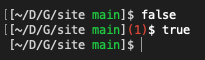
The look and feel of my PS1 is really important to me, in zsh I had it the way I liked. After a Sunday afternoon, my bash prompt code now looks like this, which emulates what I had in zsh.
if [ -f "${HOME}/.abbr_pwd.bash" ]; then
    source "${HOME}/.abbr_pwd.bash"

    FG_RED='\[\e[31m\]'
    FG_GREEN='\[\e[32m\]'
    FG_WHITE='\[\e[37m\]'
    FG_RESET='\[\e[0m\]'

    git_info() {
        local dir="$PWD"
        while [ "$dir" != "/" ]; do
            if [ -d "$dir/.git" ]; then
                if branch=$(git -C "$dir" symbolic-ref -q --short HEAD 2>/dev/null); then
                    echo "$branch"
                elif tag=$(git -C "$dir" describe --tags --exact-match --abbrev=0 HEAD 2>/dev/null); then
                    echo "$tag"
                else
                    git -C "$dir" rev-parse --short HEAD
                fi
                return
            fi
            dir="$(dirname "$dir")"
        done
    }

    set_prompt() {
        local last_exit=$?
        local exit_status_display=""
        if [ $last_exit -ne 0 ]; then
            exit_status_display="${FG_RED}(${last_exit})${FG_RESET}"
        fi

        local abbr_path="$(pwd_abbr)"
        local venv=""
        local venv_display=""
        if [ -n "$VIRTUAL_ENV" ]; then
            venv="$(basename "$VIRTUAL_ENV")"
            venv_display="${FG_GREEN}${venv}${FG_RESET}"
            export PATH="$VIRTUAL_ENV/bin:$PATH"
        fi

        local git=""
        local git_display=""
        git="$(git_info)"
        if [ -n "$git" ]; then
            git_display="${FG_GREEN}${git}${FG_RESET}"
        fi

        local middle=""
        if [ -n "$venv_display" ]; then
            middle+=" ${venv_display}"
        fi
        if [ -n "$git_display" ]; then
            middle+=" ${git_display}"
        fi

        export PS1="${FG_WHITE}[${abbr_path}${middle}${FG_WHITE}]${exit_status_display}\\$ ${FG_RESET}"
    }
    PROMPT_COMMAND="set_prompt"

else
    export PS1='\u@\h:\w\$ '
fi
Where .abbr_pwd.bash looks like this;
pwd_abbr() {
    local path="${PWD}"
    local home="${HOME}"

    if [[ "$path" == "$home"* ]]; then
        path="~${path#$home}"
    fi

    IFS='/' read -r -a parts <<< "$path"

    local result=""
    local i
    local len=${#parts[@]}

    for (( i=0; i<$len; i++ )); do
        local part="${parts[i]}"
        if [[ "$part" == "~" ]]; then
            result="~"
        elif (( i == len - 1 )); then
            result+="/$part"
        elif [[ -n "$part" ]]; then
            result+="/${part:0:1}"
        fi
    done

    echo "$result"
}
Now I get a nice looking prompt :)